Preference Centres are used by marketers to do a number of things:
Control - Give your customers control of their own data. A personalised, secure and prepopulated preference centre allows the customer to tailor and refine what they receive, when and how.
Insight - Add invaluable insights to prospects to drive content and automations. Understand your customers: their behaviours, preferences and brand loyalty.
Customise - Tailor questions, switch on and off sections and maintain brand alignment. A preference centre that’s an extension of your business.
Radar has utilised its survey technology to create a flexible and robust preference centre platform that can be configured to allow clients to review and update their own contact details and marketing permissions, as well as product and activity preferences.
The preference centre is fully GDPR compliant and keeps a complete audit of any changes made by clients. Data protection questions are stored with audit records, and are version controlled to account for changes in wording or terminology. The same process can also store privacy policy statements and Terms and Conditions at time of submission. All can be edited by a Radar user.
The preference centre can also handle email contact preferences such as snoozing and unsubscribes.
Within Radar, it allows you a number of opportunities once set up:
- Preference centre launch email
- Onboarding/welcome email
- Operational communications (particularly where you don’t currently have consent)
- Re-engagement email - “is there anything you would like to hear more about?”
- An optional link on the newsletter sign-up
- QR codes on postal pieces
Using these opportunities, you can increase personalisation, reengage with contacts, better target your emails, paid marketing and direct mail marketing, as well as improving the overall quality of your contact data.
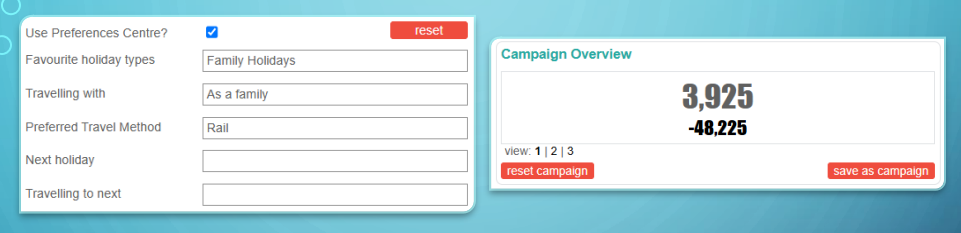
The screenshot attached below allows you to see all options for the Radar Preference Centre, so that you can choose the questions you ask your contact.
Once this data is in Radar, you can then use it to better target your campaigns:
How we help
We will not only set up your Preference Centre, we can also set up the related web pages and emails, embed into existing pages onsite, and help your team with supporting emails and marketing around the launch of the Preference Centre.
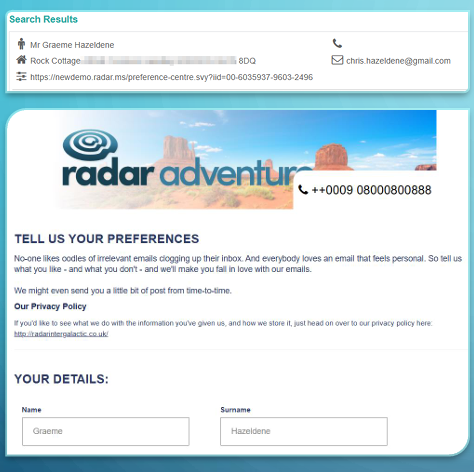
Pre-population
Radar will pre-populate the preference centre with every contact on the database, as well as their current marketing permissions and product preferences. These can be determined from a number of historic and ongoing sources, such as:
- Bookings
- Brochure requests
- Newsletter signups
- CSQ
- Ah hoc shows and competitions
Format/Design
Up to 5 types of preference can be specified, e.g.
- Product – Summer, Winter, Art, Architecture, etc.
- Destination – France, Brazil, South America, China, etc.
- Activity – Skiing, Sailing, Cycling, Trekking, etc.
- Activity level – Beginner, Intermediate, Expert
- Party Type – Groups, Family, Couples, Solo
Different methods of selecting options are available e.g. multi-select, single, required fields, etc.
Permissions fields will include mandatory yes/no options for up to 4 channels, and can be prepopulated with existing data where required.
Radar will host the preference centre and its related pages, but code can be provided to enable it to be referenced by an iframe on the client’s website, which will allow the client control of the header and footer to utilise any web page templates they may have.
Confirmation pages or messages can be provided following successful submissions or login attempts
Security
Secure and personalised codes are automatically generated by Radar and can be added to survey links to validate the link and retrieve data from the database. The codes are generated in multiple parts which all need to match to function. Changing any part of the code will cause the link to fail which means no user can access another’s preference centre.
For contacts without email contact permission an equally secure but more user-friendly code can be generated for inclusion in postal marketing. The code will serve as a secure login for those contacts.
The preference centre can also be accessed without a secure code, but requires a two-step validation process where a secure link is emailed to the contact to access the preference centre. This approach can also be used for new contacts to sign-up and personalise their preferences.
Data Alignment
Using Radar’s flexible and robust API, triggers can be set up to communicate any updates with external systems to keep preferences aligned.
Alternatively, reports can be made available to download in Radar, or sent automatically via email or FTP for manual processing.
If you are interested in adding a Preference Centre to your website, please speak with your Account Director, who can advise on next steps. You can also find out more about the benefits of Customer Preference Centres here.
Was this article helpful?
That’s Great!
Thank you for your feedback
Sorry! We couldn't be helpful
Thank you for your feedback
Feedback sent
We appreciate your effort and will try to fix the article