Constructing API Calls
By sending information through authenticated web requests, your organisation can automatically share key records—such as sales, customer, or operational data—without manual uploads or spreadsheets. The connection uses a unique API key to verify access and standardised formatting to ensure data is accurate and consistent. This approach streamlines data exchange, reduces human error, and enables real-time updates between your systems and Radar.ms.
To enable this automated data transfer, the Radar.ms API requires a few setup steps that define how your system connects and sends information. Each connection uses a secure API key to authenticate your organisation, a designated endpoint that identifies the type of data being shared, and a standardised format to ensure compatibility across systems.
The following sections outline these requirements in more detail, including how to structure your API requests, authenticate properly, and format your data for successful imports.
Authentication
Send your API Key as an HTTP header...
apikey: [api key]
...or in the query string
apikey=[api key]
Endpoint details
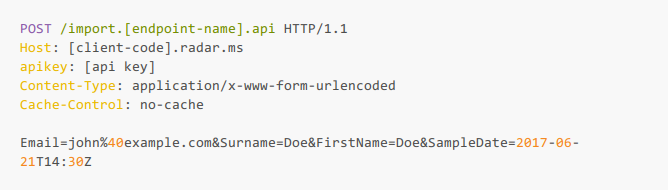
Data should be sent as a POST request, form url encoded (see example below) to: https://[client-code].radar.ms/import.[endpoint-name].api
Parameters
Any number of key value pairs can be sent in the request. Dates should be sent using the standard ISO 8601 format.
Example request body
Was this article helpful?
That’s Great!
Thank you for your feedback
Sorry! We couldn't be helpful
Thank you for your feedback
Feedback sent
We appreciate your effort and will try to fix the article