The Dashboards for your Emailer allow you to see data insights on a number of levels:
Overview Dashboard:
Here you can see how your emails have performed by month. This is automatically set at the current month, but you can click through to compare months in the top lefthand corner.
You can see total transactions for the month, as well as emails sent and emails triggered. There is also an overview of Delivered, email Opens and Clicks, and how this month's compare to the previous six month's of data.
To see more detailed data for the month, click the In Depth button:
Month In Depth Dashboard
On the second page of the Dashboard, we can see the emails sent that month in more detail, showing how they impact the overall performance for that month: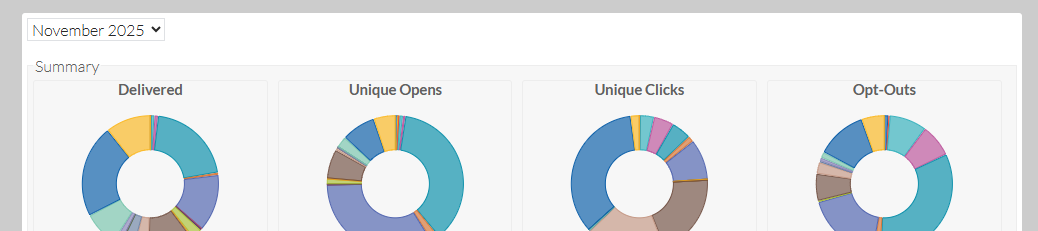
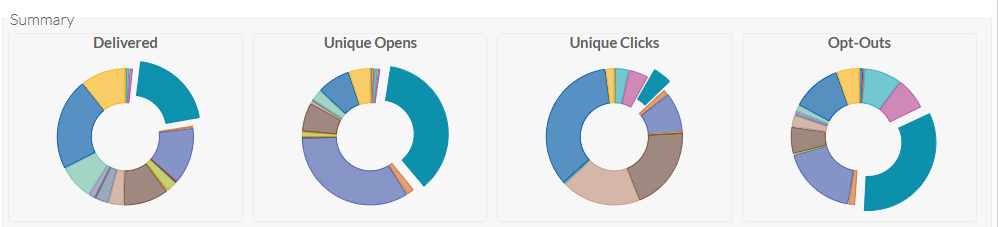
You can also click on a particular email from that month, to understand how that specific email has affected the overall figures:
If you wish to see more detail about that email and a comparison against the average, you can choose an email from the list and click on the ...in Depth button again for the third Dashboard:

Email In Depth Dashboard
Here we can see more detailed data on specific email campaigns, as well as having a comparison against the other emails on average:
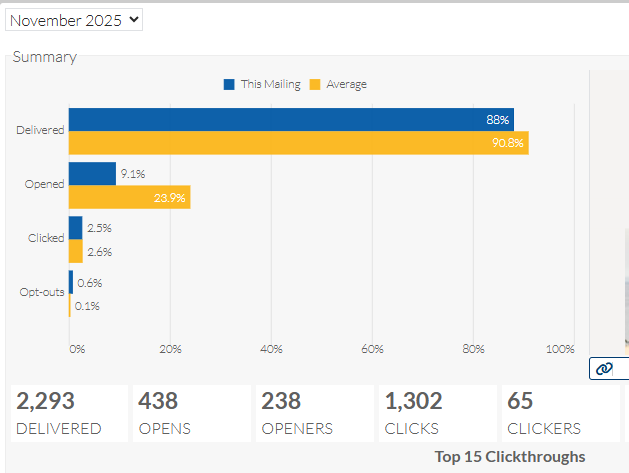
You'll see not only the results for that specific email, you'll see a copy of the email from the Emailer for reference, and the top clickthrough URLs on that email - both unique and total clicks.
If you hover over the data it'll also show you the total numbers in percentages, which is helpful for reporting.
There is also a link under the email visual, to open a full copy of the email in browser.
Once you have all the information you need for this particular email, you can click on the back buttons on the bottom righthand side of the window, to return to the second and then first dashboards.
If there is anything you would like to see on your dashboards, please speak to your Account Director. If there are any questions around any aspect of the dashboard data, please raise a Freshdesk ticket with the full query and we'll get our team to take a look and advise further.
Was this article helpful?
That’s Great!
Thank you for your feedback
Sorry! We couldn't be helpful
Thank you for your feedback
Feedback sent
We appreciate your effort and will try to fix the article